Google wants to rank pages that give visitors a positive experience.[2] Let’s look at a few ways to do this.
Use HTTPS
Nothing is worse for visitors than their personal data being susceptible to hackers. Always encrypt your site with SSL/TLS.
Choose an appealing design
Nobody wants to visit a website that looks like it’s from the ’90s. So while there’s no need to redesign your website every few months, it should look good and reflect your brand.
Make sure it’s mobile-friendly
More searches are now done on mobile than desktop. So it’s critical that your website is as pleasant to use on mobile as on desktop.
Use a readable font size
People browse the web using all kinds of devices. Make sure your content is readable across the board.
Avoid intrusive pop-ups and ads
Everyone hates ads, but sometimes you need them. If that’s the case, avoid intrusive interstitials. Pages with these may not rank as highly.[4]
Make sure it loads fast
Page speed is a ranking factor on desktop and mobile. But this doesn’t mean your site needs to load lightning fast. It only affects pages that deliver the slowest experience to users.
Create a logical site structure
It should be easy for visitors and search engines to find content on your site. That’s why it’s important to create a logical hierarchy for your content. You can do this by sketching a mind map.
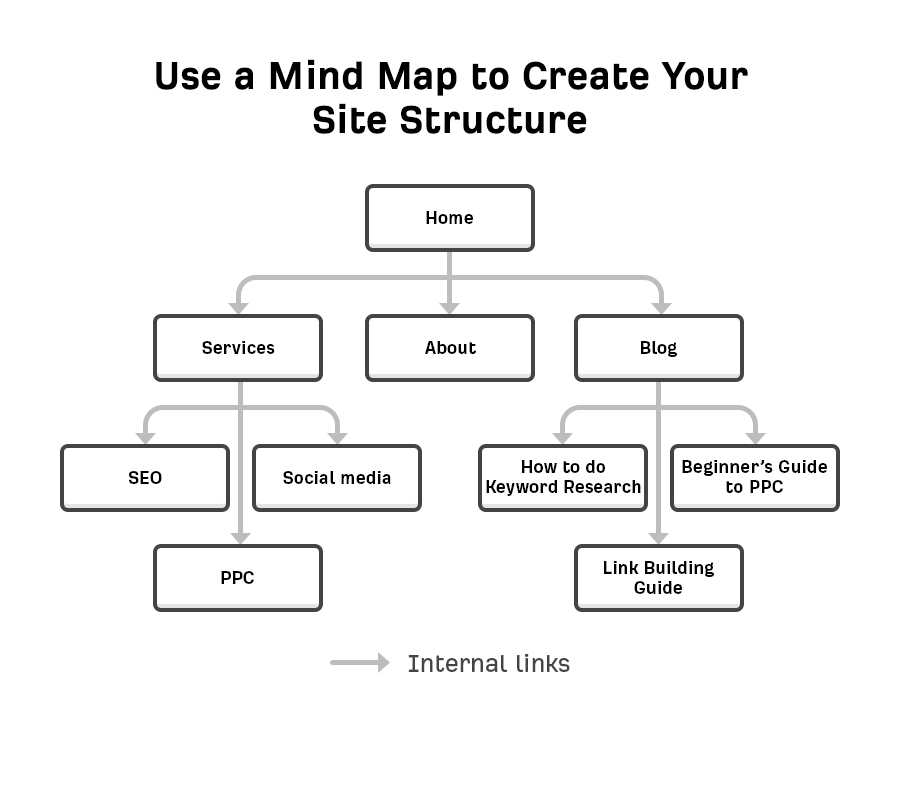
Each branch on the map becomes an internal link, which is a link from one page on a website to another.
Internal links are crucial for UX and SEO for a few reasons:
- They help search engines find new pages. Google can’t index pages it can’t find.
- They help pass PageRank around your site. PageRank is the foundation of Google search. It judges the quality of a page by analyzing the quantity and quality of links that point to it. It’s still used by Google today.[7]
- They help search engines understand what your page is about. Google looks at the clickable words in the link for this, otherwise known as anchor text.[8]
Use a logical URL structure
URLs are important, as they help searchers understand the content and context of a page. Many website platforms let you choose how to structure your URLs. These are the five main options for URLs in WordPress:
- Plain: website.com/?p=123
- Day and name: website.com/2021/03/04/seo-basics/
- Month and name: website.com/03/04/seo-basics/
- Numeric: website.com/865/
- Post name: website.com/seo-basics/
If you’re setting up a new site, go with the clearest and most descriptive structure. That’s post name. If you’re working with an existing website, it’s rarely a good idea to change the URL structure; it may break things.
Leave a Reply